Overview
The Correspondence Log is one of the first places you should look to track customer communications and payment submissions through the Alarm Payment Portal. It provides a complete audit trail of all customer interactions, giving you quick insight into payment history, collection efforts, and statements sent.
Accessing the Correspondence Log
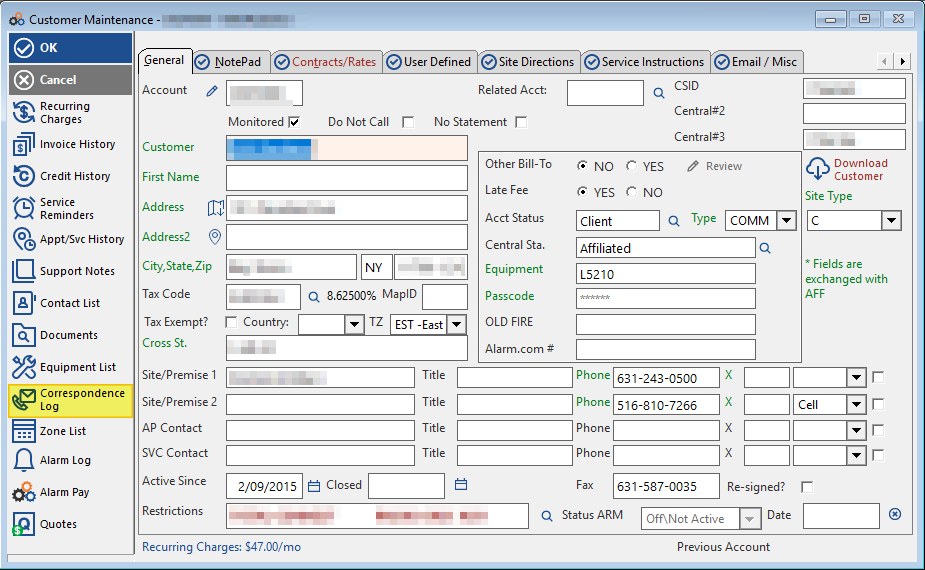
The Correspondence Log is accessed from within the Customer Maintenance screen. Look for the Correspondence Log icon in the left-hand navigation panel of the customer record.
What the Correspondence Log Records
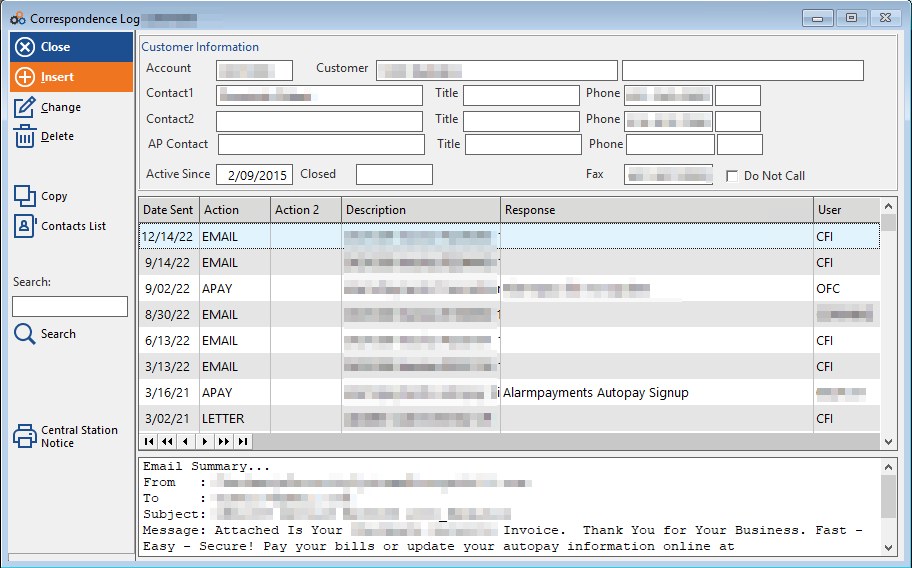
The Correspondence Log tracks a wide variety of customer interactions and communications, including:
| Communication / Activity Type |
|---|
| Payment submissions through the Alarm Payment Portal |
| Statements that have been sent out |
| Reprints |
| Emails |
| Letters |
| Collection calls |
| Successful payment submissions |
| Declined payments |
When to Check the Correspondence Log
Verifying Payment Submissions
If you are unsure whether you submitted an AlarmPayments transaction for a past due invoice, or if Cornerstone or the Subscriber has submitted payment, check the Calls & Mailings Icon (Correspondence Log).
Understanding Payment Sources
If you are looking at the payments in an Invoice and do not fully understand where a payment came from, the Correspondence Log Icon is a good first place to look.
What You'll Find:
- When a payment was successfully submitted via the Alarm Payment Portal
- When a payment was declined
- Who submitted the payment (dealer, subscriber, or Cornerstone)
Benefits
The Correspondence Log provides:
- Complete audit trail of all customer communications
- Payment submission history and status
- Collection effort tracking
- Verification of statements and emails sent
- Quick reference for payment troubleshooting
Need Additional Help?
Our Customer Success team is here to assist you.
Phone: 847-405-9517 x1
Email: customer.success@alarmbills.com
Copyright © 1999–2026 Cornerstone Billing Solutions. All rights reserved.
Was this article helpful?
That’s Great!
Thank you for your feedback
Sorry! We couldn't be helpful
Thank you for your feedback
Feedback sent
We appreciate your effort and will try to fix the article