Bank Deposits Report
Reports · RMR Audits / Tracking · Tip Sheet
Footing bank deposit entries just got easier — the Bank Deposits Report is a fast and easy way to check your totals!
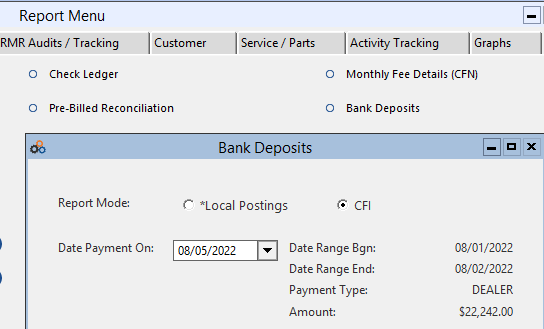
The Bank Deposits Report allows you to choose if you are recording a deposit made to your bank account by Cornerstone, or if you are making a deposit of payments received at your office that you applied in Cornerstone. The report is found under Reports → RMR Audits / Tracking → Bank Deposits.
CFI (Cornerstone) Deposits
The CFI deposits selection recognizes your payment schedule dates and provides the Total Amount deposited in your account for a given payment date, defaulting to the latest payment date.
The report shows your Dealer Schedule of payments. Source detail included in the displayed Deposit Total is highlighted in green. This data comes from a read-only file copied nightly from Cornerstone’s Posting software. Cornerstone calculates the receipts and submits the ACH transaction the day before your deposit date, so data will be available for the report on the day of the deposit.
Report Menu & CFI Mode Selection
Dealer Payment Schedule — CFI Deposit Results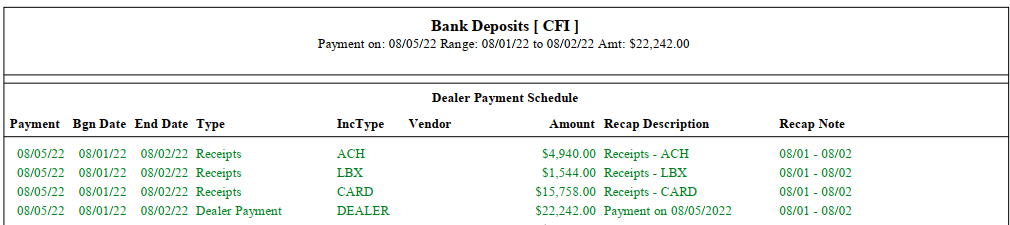
*Local Postings Deposits
The *Local Postings deposits selection requires you to enter a date range for the bank deposit you are making. You may make deposits daily or weekly — simply enter the date range you want.
All dealer *Local Posting Income Types are designated with *. The Limit Income Type filter defaults to “All” for most dealers, and “*CARD Only” for dealers with their own merchant account.
Local Postings Mode — Date Range Entry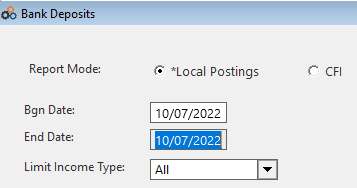
Reading the Local Postings Report
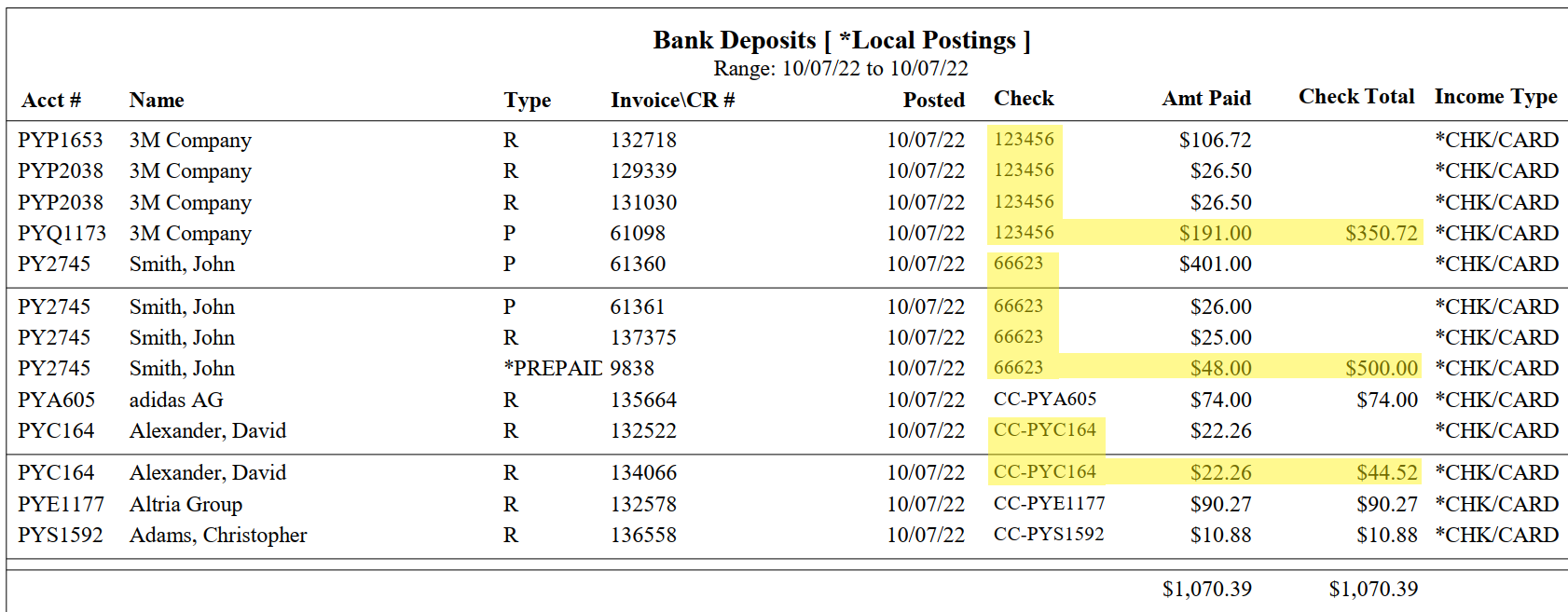
The report provides payments posted against invoices, sorted by Check number then Account number. This helps you verify that a single check posted against multiple invoices totals to the correct check amount.
For example, Check# 123456 totaled $350.72 but was split across 4 invoices and 3 accounts. Check# 6623 totaled $500.00 and was applied to 3 invoices in the same account, with the remaining amount recorded as a *PREPAID Credit (Credit #9838).
For non-numeric check numbers — such as no check number entered, or “CC” for a credit card transaction — the report includes the customer account number in the Check column to correctly sum multiple invoice payments tied to the same payment type.
Local Postings Report — Payment Detail
⚠ Dealers with Their Own Merchant Account
If you have your own merchant account through Cornerstone’s credit card provider, run the report with the default filter “*CARD Only” to return the credit card deposits you receive directly from Payroc.
Use the “Exclude *CARD” option to see all other *Local postings. These amounts continue to be recorded in the Dealer PMT support note alongside the regular deposits Cornerstone makes.
Copyright © 1999–2026 Cornerstone Billing Solutions. All rights reserved.
Was this article helpful?
That’s Great!
Thank you for your feedback
Sorry! We couldn't be helpful
Thank you for your feedback
Feedback sent
We appreciate your effort and will try to fix the article