Overview
The A/R Reconciliation Report uses data collected and stored when Cornerstone generates the End of Month (EOM) Recap. This report helps you reconcile changes to accounts receivable during the month.
Important: Cornerstone generates EOM Recaps on the last day of the month between 7:30 to 8:30 p.m. CST. Any changes made by users during or after that time can result in EOM reports not matching the Recap.
How the Report Works
The A/R Reconciliation Report starts with last month's ending receivables compared to the current month's ending receivables to establish the change in A/R to reconcile.
The report includes:
- Beginning Receivables (previous month's ending)
- Ending Receivables (current month)
- Changes to A/R including Additions, Reductions, and Adjustments during the month
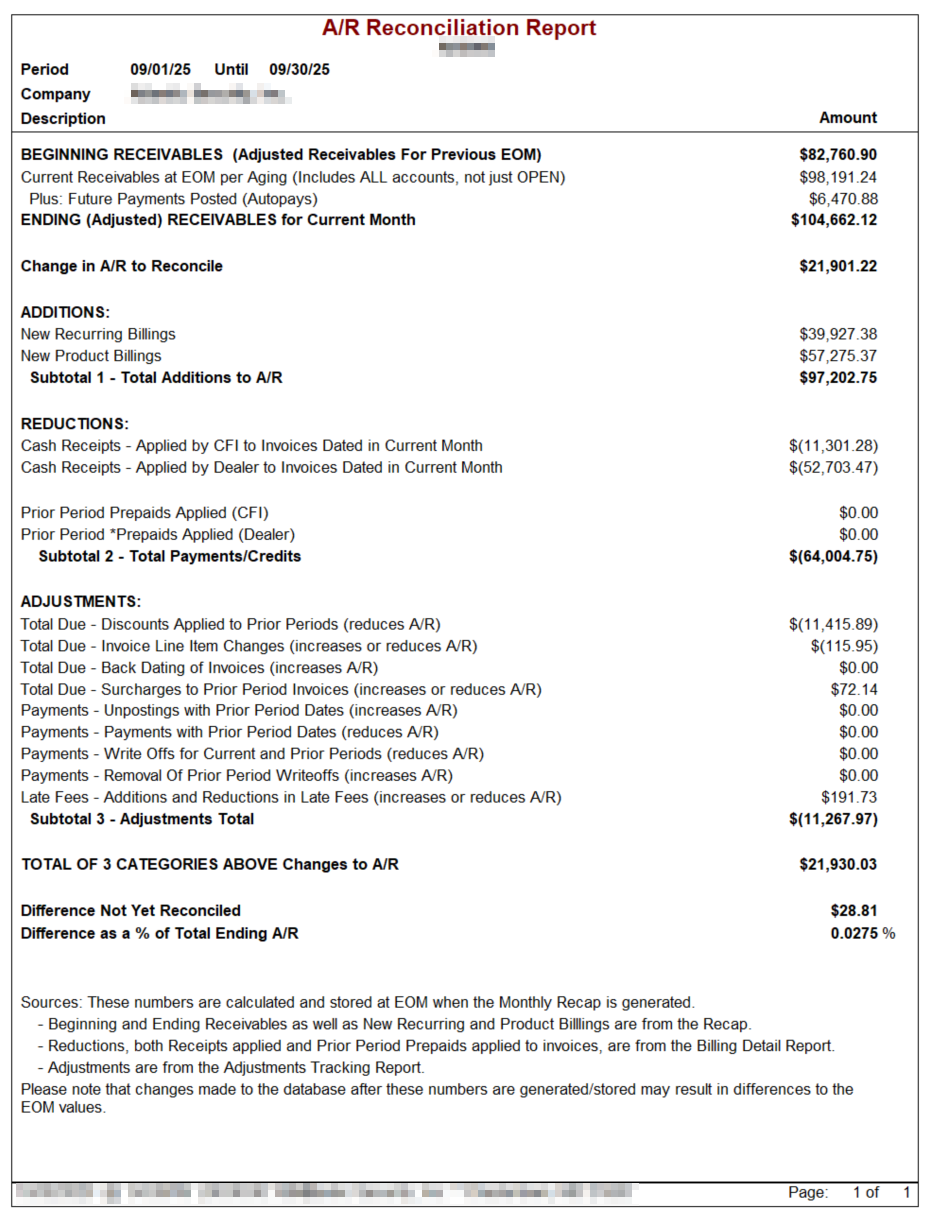
Beginning and Ending Receivables
Source
These numbers correspond to the Aging Report for ALL accounts (not just OPEN accounts) generated at EOM.
Autopay Adjustment
The current receivables are adjusted by adding the amount of autopay invoices that have a "future" paid date, because they are technically "owed" on the last day of the month.
- Autopay payments are accounted for in the reduction section as payments against invoices during the period
- Future payments posted are available by running the Cash Receipts Report for the future period
Additions to A/R
Additions to receivables include the dollar amount of new Recurring and Product invoices generated during the month.
Sources
- EOM Recap
- Billing Detail Report
- Invoice History Report
Reductions to A/R
There are two main categories of reductions:
1. Payments Received and Posted to Invoices
Payments that customers make and are applied to outstanding invoices.
2. Application of Prior Period Prepaid Credits
Unapplied payments (prepaid credits) that get applied to invoices during the period.
Adjustments to A/R
Various adjustments can be made to invoices during the month that affect receivables. Some increase A/R, some reduce it.
Adjustments - Additions to A/R
These adjustments increase accounts receivable:
- Increases in line-item amounts to prior period invoices
- Entry of past period date for a new invoice or back dating an existing invoice
- Removal of prior period payments
- Addition of late fees to prior period invoices
- Removal of write-offs on prior period invoices
- Removal of applied *Prepaid or Prepaid Credits
- Removal of Discount Credits
Adjustments - Reductions to A/R
These adjustments decrease accounts receivable:
- Reductions in line-item amounts / deletion of prior period invoices
- Payments applied using a prior period date
- Reductions in late fees
- Write-offs of prior period amounts
- Discount Credits applied to invoices
Understanding the Adjustments Report
The Adjustments Report tracks numerous adjustments including those that can affect A/R. Not all adjustments in the report affect A/R – only the ones affecting A/R are included in the A/R Reconciliation Report.
Report Sections
Section 1.0: Total Due Adjustments (Discount Credits)
Take the Total Change of the section as it sums the amount of discount credit activity to invoices from prior periods.
- Applying credits reduces A/R
- Removing discounts that had been applied increases A/R
Section 1.5: Total Due Adjustments (Line Item Changes)
Take the Total Change as it provides a net of any increases or decreases to invoice line item amounts created in a prior period.
- Increasing charges (e.g., NSF fees for declined ACHs) increases A/R
- Reducing charges decreases A/R
Section 1.6: Total Due Adjustments (Invoice Date Changes)
Ignore unless you have special permission to allow back dating invoices. Adding invoices with a prior period date increases A/R not captured in current month's new invoices.
Section 2.0: Payment Adjustments (Un-postings with Prior Period Dates)
Take the Total Change as the removal of or reductions in payments posted in a prior period increases A/R. Any increases in amounts paid reduces A/R.
Section 2.2: Payment Adjustments (Payments with Prior Period Dates)
Take the Total Change as a negative value.
Important: We do not recommend posting a payment with a prior period date because it changes history. Previously generated Cash Receipts reports become inaccurate if you "back-post" payments to an invoice.
Section 2.5: Payment Adjustments (Future Periods)
Ignore as these changes are in the current period and accounted for in the aging report/calculation of ending receivables. This mostly includes autopay invoices where the autopay method is declined.
Section 3.0: Payment Adjustments (Write-offs)
Take the Total Change as a negative value as it gives the amount of write-offs applied during the period, reducing A/R.
Write-offs are also captured in the Billing Detail and Cash Receipts Reports.
Section 3.2: Payment Adjustments (Write-offs) Removal of Prior Period Write-offs
Take the Total Change as a positive value or the Before Amount as removing previously written-off invoices in this period increases A/R.
Section 4.0: Late Fee Adjustments
Take the Total Change of this section as the application of a late fee to an aged invoice increases A/R.
If you utilize ARM Solutions for 3rd Party Collections and assess a late fee when the account is uploaded to ARM, that fee will be included in this section.
Section 5.0: Credit Adjustments
Ignore this section as it only tracks changes made to credits in the Credit History. Credits are unapplied receipts and don't affect A/R directly.
Cornerstone's CFN Software and Cash Receipts
What is CFN?
Cornerstone accounts for all cash receipts in a separate database program (CFN) that is independent from the Cornerstone software.
CFN is used to batch-post all payments processed through:
- Lockbox (LBX)
- Manual (MAN)
- One-time credit card (CARD or *CARD)
- ACH debits (ACH)
These categories match up with an "Income Type" when posting occurs.
Income Types
Automatic Recurring Charges:
- Checking
- Visa
- MasterCard
- Discover
Cornerstone's "CFN Cash Receipts" report includes these subcategories within either ACH or CARD as appropriate.
Dealer Postings:
All payments posted locally by the dealer should use *CHK/CARD or other *Income Types to distinguish that funds were directly deposited into the dealer's bank account.
CFN for Billing and Recaps
CFN is also used to:
- Track billing fees and dealer payments
- Generate EOM Dealer Recaps
Recaps are generated on the last day of the month from 7:30 – 8:30 p.m. CST.
Recommendation: Do not make changes to the database that evening so generated reports can be tied out to the Recap.
CFN Accuracy and Reconciliation
Guaranteed Accuracy
We use CFN to process and post many millions of dollars of payments. Because it is used to tie out all receipts/payments, and no one outside Cornerstone has access to it – we guarantee its accuracy.
The Cash Receipts Report (CFN) looks to the separate system CFN's Database for the information it provides.
Common Reconciliation Issues
Some customers want to reconcile the CFN Receipts Report to the Software Cash Receipts Report. What happens after payments are posted to the software is beyond our control.
Reasons for potential differences include:
- Double-Posting Errors - Dealer staff posted a check "CHK/CARD" but then mailed it to the lockbox
- Zeroed-Out Credits - Credit amounts reduced to zero by dealer staff for unknown reasons or for posting service payments to a different system
- Invoice Error - Dealer staff generated a Recurring Invoice for an ACH customer for a billing period already passed
- Income Type Error - Dealer staff posts a payment using an Income Type reserved for Cornerstone
- Data Entry Error - Inputting wrong date, shifting income to a different month
- Edits at EOM - Changes made after Cornerstone generated the EOM recap and before reports are generated
Best Practices
Monthly Accounting Routines
It's important to develop your own, consistent monthly accounting routines.
Adjustments Tracking
Cornerstone has developed an Adjustments Tracking Report that captures all financial changes to an account. In some cases, those changes do not affect A/R (such as autopay invoices declined and unposted in the current month).
Booking to Your Accounting Package
You can book to your accounting package certain entries on the month-end recap that we provide to you.
Important: Because you manage your database, Cornerstone's assistance with accounting questions, issues, or reconciling problems is very limited. Please seek assistance from your accountant with these issues.
Common Issues
Most issues arise from:
- Inconsistent usage of the software
- Inadequate training
- User errors
Need Help?
Still have questions? Contact Cornerstone Holding Co. 847-405-9517 or email us customer.success@alarmbills.com
Was this article helpful?
That’s Great!
Thank you for your feedback
Sorry! We couldn't be helpful
Thank you for your feedback
Feedback sent
We appreciate your effort and will try to fix the article