Overview
This guide explains how to edit a tokenized credit card that is already on file in the system. Because tokenized cards have additional security protections, the editing process works differently from a standard card update. Follow the steps below to understand your options and make changes safely.
This article is intended for users who manage billing and payment methods within their Cornerstone Billing Solutions account.
Steps to Edit a Tokenized Credit Card
- Click the pencil icon next to the credit card number you wish to edit. A confirmation window will appear presenting you with three choices about how to proceed.
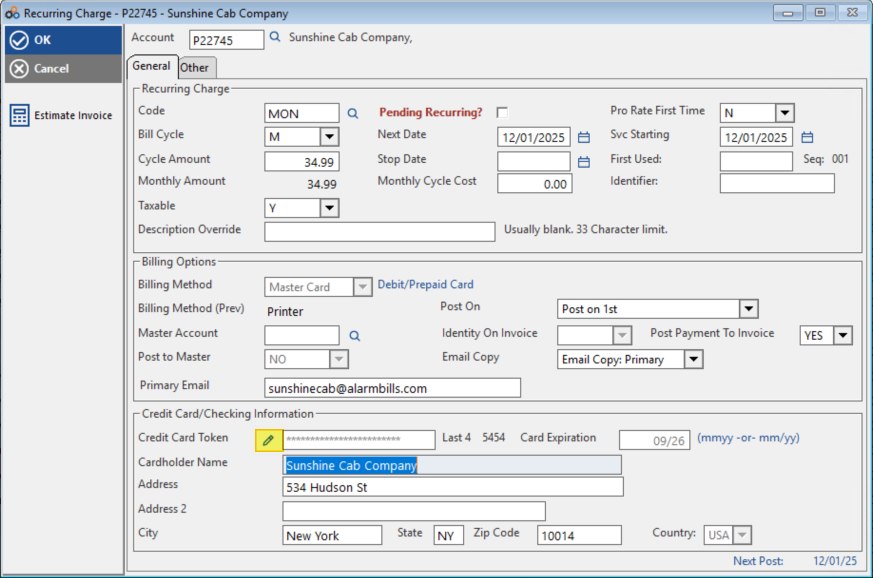
- Review your three options in the confirmation window and select the one that matches your intent:
| Option | What It Does |
|---|---|
| Remove | Completely deletes this credit card from the system. All recurring charges that were using this card will automatically be switched to the "Printer" (mailed invoice) payment method. |
| Set to Printer | Changes only the specific recurring charge you are currently editing to the "Printer" (mailed invoice) method. The credit card remains on file and continues to be used for any other recurring charges associated with it. |
| Cancel | Closes the window without making any changes. The credit card and all associated charges remain exactly as they were. |
- Proceed with your chosen option. Once you click either Remove or Set to Printer, you will be able to edit the billing method on the specific charge. At this point you can add a different card, change the billing to be emailed, or select another available payment method.
⚠️ IMPORTANT
If you choose Remove, you will be unable to retrieve this card information from the system afterward. To use this card again in the future, you would need to reach out to your customer directly to obtain their card details. Additionally, selecting Remove will automatically switch ALL recurring charges associated with this card to the "Printer" (mailed invoice) payment method — not just the charge you are currently editing.
Need Additional Help?
Our Customer Success team is here to assist you.
Phone: 847-405-9517 x1
Email: customer.success@alarmbills.com
Copyright © 1999–2026 Cornerstone Billing Solutions. All rights reserved.
Was this article helpful?
That’s Great!
Thank you for your feedback
Sorry! We couldn't be helpful
Thank you for your feedback
Feedback sent
We appreciate your effort and will try to fix the article