Invoices Don't Fit Windowed Envelopes
Overview
You print an invoice and try to fold it to fit into a #10 envelope and it won't fit.
Step-by-Step Instructions
Step 1: Printer Settings
Check your printer settings. Often this is being controlled by windows.
Step 2: Turn Off Resize or Scale to Fit.
When printing, check your printer settings to make sure you are not set for 'Fit to Page' or 'Scale to Fit' or are manual changing the scale.
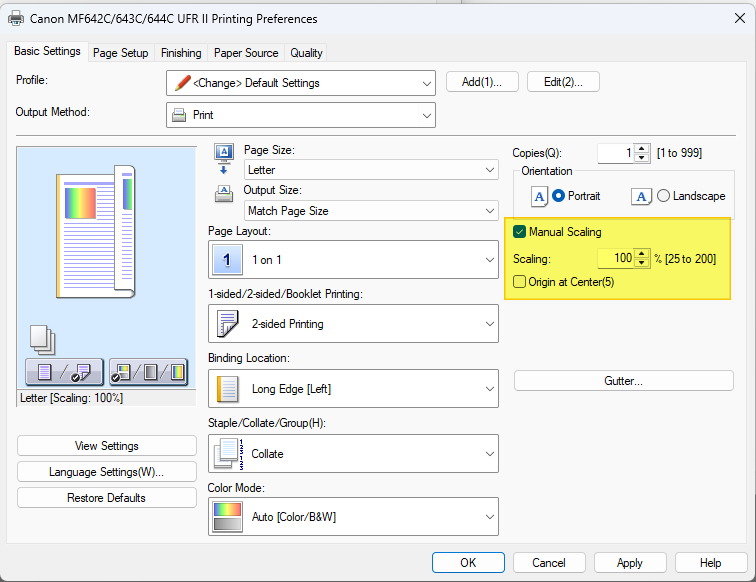
⚠️ Important: If you allow windows to control the output of the printer, it may be setting these options for you automatically. Double check your printer settings, print one invoice and test.
Need Help?
Our Customer Success team is here to assist you with any questions.
Email: customer.success@alarmbills.com
Phone: 847-405-9517 x1
Copyright © 1999–2026 Cornerstone Billing Solutions. All rights reserved.
Was this article helpful?
That’s Great!
Thank you for your feedback
Sorry! We couldn't be helpful
Thank you for your feedback
Feedback sent
We appreciate your effort and will try to fix the article