Overview
This guide explains how to manually create a recurring (R) invoice for a customer account. You may need to do this when creating a catch-up invoice for recurring billing, when you do not want to start a customer mid-cycle, or when a pro-rated recurring invoice is not appropriate. By manually creating a recurring invoice, you retain full control over the charges, amounts, and billing period displayed.
This guide covers how to open the blank recurring invoice, select and configure an RMR charge code, enter amounts, set taxability, and optionally add a billing period text line.
When to Use a Manual Recurring Invoice
Use this process in the following situations:
- You need to create a catch-up invoice for recurring billing.
- You do not want to start the customer mid-cycle.
- You do not want a pro-rated recurring invoice.
Step-by-Step: Create a Manual Recurring Invoice
Part 1 — Open the Invoice History and Insert a New Invoice
- Open the customer account.
- Click > Invoice History.
- Click > Insert.
The Invoice History screen will open, displaying any existing invoices for the account. Clicking Insert begins the process of creating a new invoice.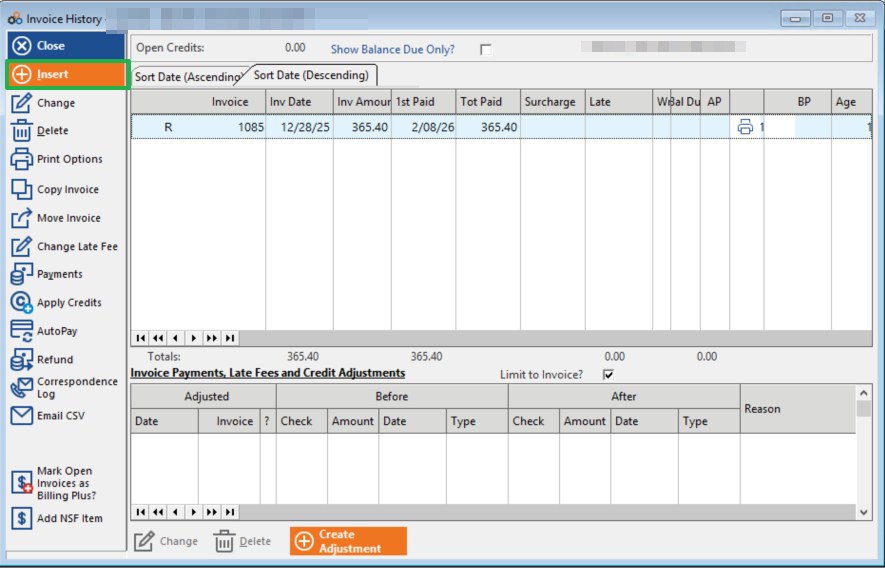
Part 2 — Select Invoice Style
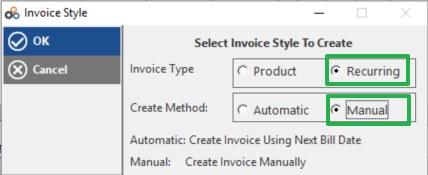
The Invoice Style window will appear. Configure it as follows:
- Invoice Type — Select > Recurring
- Create Method — Select > Manual
⚠️ IMPORTANT
Selecting Manual as the Create Method creates the invoice manually rather than using the Next Bill Date. Make sure you select Recurring as the Invoice Type — selecting Product will create a different invoice type.
Part 3 — Add a Charge Line to the Blank Recurring Invoice
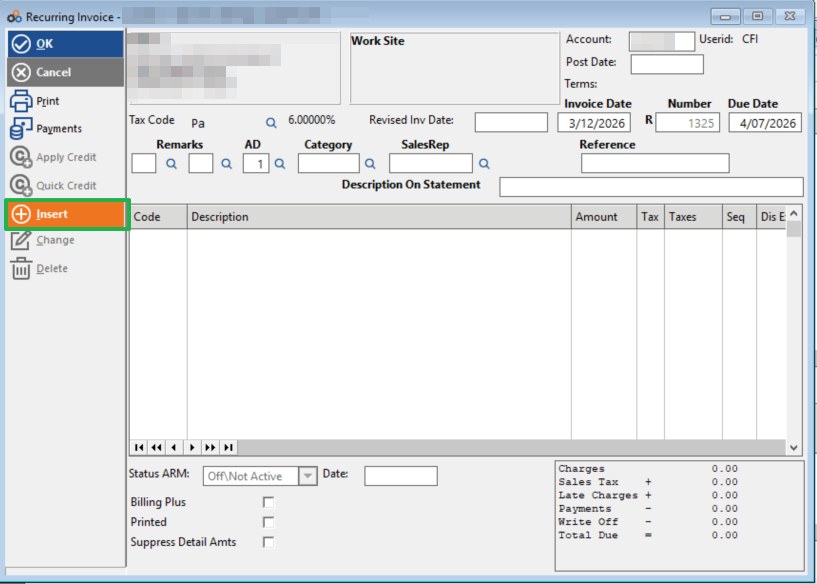
With the blank R Invoice open, you are ready to add a recurring charge line.
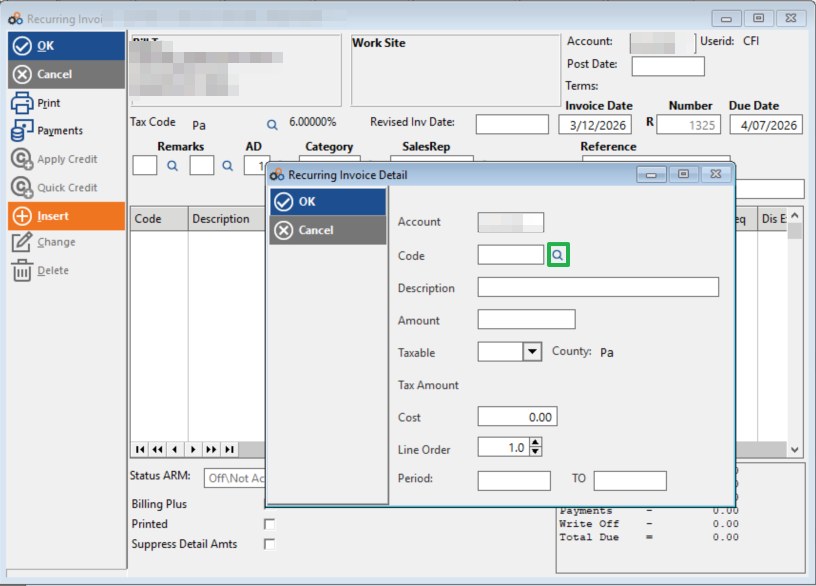
- Click > Insert to open the Recurring Invoice Detail window.
Part 4 — Select an RMR Code
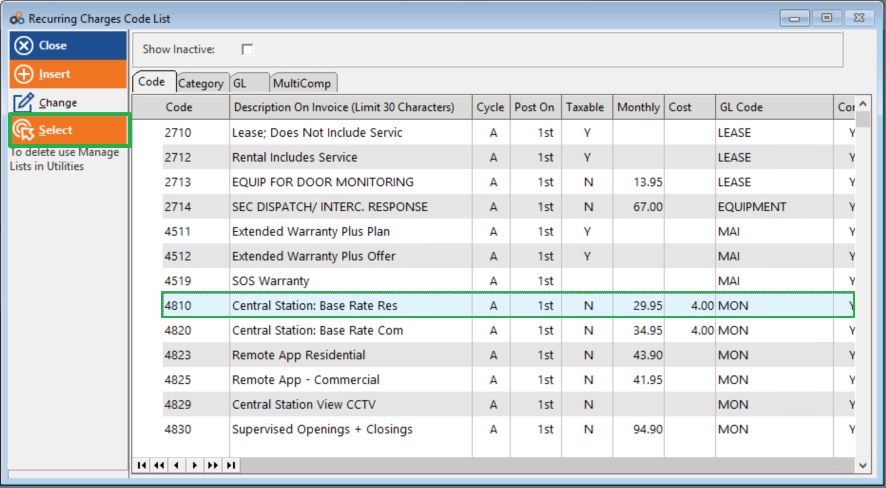
- Click the Magnifying Glass symbol next to the Code field to open the Recurring Charges Code List.
- Find the RMR code you would like to use.
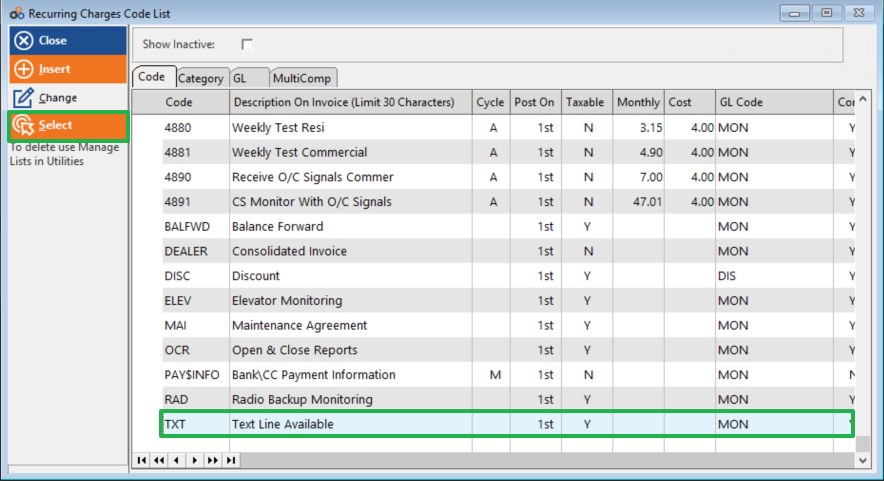
- Highlight the code, then Click > Select.
Part 5 — Enter the Charge Details
With the RMR code selected, complete the charge details in the Recurring Invoice Detail window:
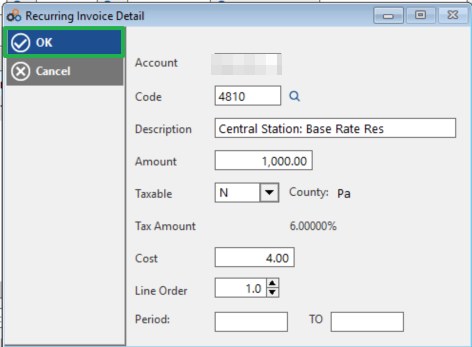
- Enter the dollar amount in the Amount field.
- Select Taxable Y or N as appropriate.
- Click > OK to save the charge line.
The example below shows code 4810 — Central Station: Base Rate Res entered with an amount of $1,000.00 and Taxable set to N.
Optional: Add a Billing Period Text Line
If you would like to display the billing period on the invoice, you can add a text-only line using a TXT code (or a similarly named RMR code of your choice). This allows you to add a note to the invoice without attaching a dollar amount.
- Click > Insert again on the Recurring Invoice screen to open a new Recurring Invoice Detail window.
- Click the Magnifying Glass and select the TXT code (or your preferred text code) from the Recurring Charges Code List.
- Enter your billing period note in the Description field (for example: For Period 1/1/26 To 3/12/26). Leave the Amount field blank.
- Click > OK to save the text line.
The TXT code appears in the Recurring Charges Code List as Text Line Available, as highlighted below.
The example below shows the TXT line detail window with the description For Period 1/1/26 To 3/12/26 entered and no dollar amount.
Save the Invoice
Once all charge lines (and any optional text lines) have been added, save the invoice:
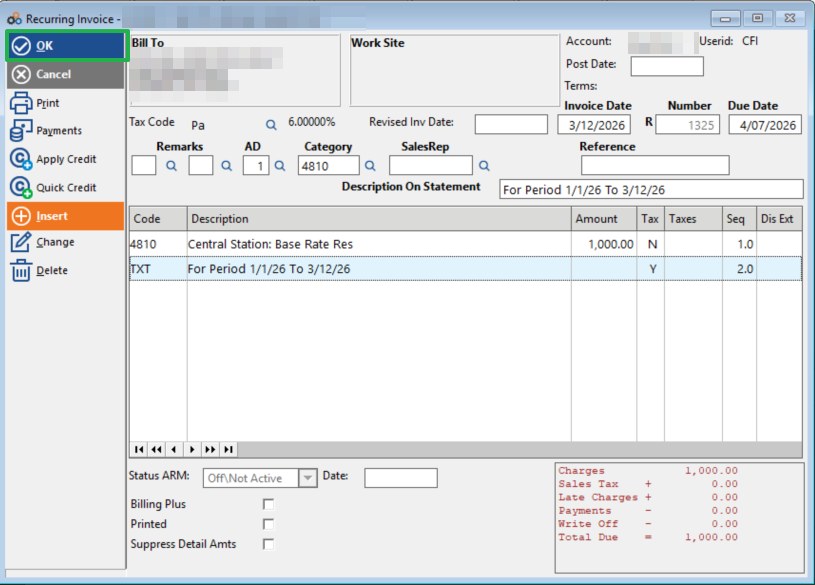
- Click > OK to save the completed recurring invoice.
The completed invoice will display all charge lines, the billing period text (if added), and a summary of charges in the bottom right. The example below shows code 4810 and the TXT billing period line both saved to the invoice, with a Total Due of $1,000.00.
Process Summary
| Step | Action |
|---|---|
| 1 | Open customer account > Invoice History > Insert |
| 2 | Invoice Style: Invoice Type = Recurring, Create Method = Manual |
| 3 | On blank R Invoice > Click Insert |
| 4 | Click Magnifying Glass > Find and Select RMR code |
| 5 | Enter dollar amount, set Taxable Y/N > Click OK |
| 6 (Optional) | Insert a TXT code line with billing period description and no dollar amount > Click OK |
| 7 | Click OK to save the invoice |
Related Articles
The following articles in this knowledge base may also be useful when working with recurring invoices:
- Untitled Article (Billing & Payments, May 6, 02:07 PM) — How to generate and deliver a single recurring invoice on demand, including print, email, and CornerMail delivery options.
- Untitled Article (Billing & Payments, May 6, 02:04 PM) — How to navigate to the Apply Credits screen and apply discount or prepaid credits to open invoices.
- Untitled Article (Troubleshooting & FAQs, May 6, 02:23 PM) — Multi-page support for CORNER2 and DEALER2 recurring invoice forms.
Need Additional Help?
Our Customer Success team is here to assist you.
Phone: 847-405-9517 x1
Email: customer.success@alarmbills.com
Copyright © 1999–2026 Cornerstone Billing Solutions. All rights reserved.
Was this article helpful?
That’s Great!
Thank you for your feedback
Sorry! We couldn't be helpful
Thank you for your feedback
Feedback sent
We appreciate your effort and will try to fix the article