Overview
You can filter your customer lists to quickly find customers with specific criteria, making it easier to manage your accounts and recurring revenue. This article explains how to apply filters on both the Customer List screen and the Recurring Research screen.
Using these filters, you can:
- Filter the Customer List screen for customers with restrictions and/or active RMR
- Filter the Recurring Research screen for RMR customers with or without any restrictions
Filtering on the Customer List Screen
To filter for customers with specific attributes, check the boxes at the top of the Customer List screen:
| Filter Checkbox | What It Shows |
|---|---|
| Has Restrictions? | Shows only customers that have restrictions |
| Has Active RMR? | Shows only customers with active recurring monthly revenue |

? TIP
You can check one or both boxes to filter for customers that meet your selected conditions.
Filtering on the Recurring Research Screen
The Recurring Research screen allows you to filter RMR customers based on whether they have restrictions. Follow the steps below for each scenario.
To Display Customers WITH Restrictions
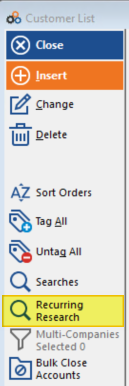
- Go to the Recurring Research screen.
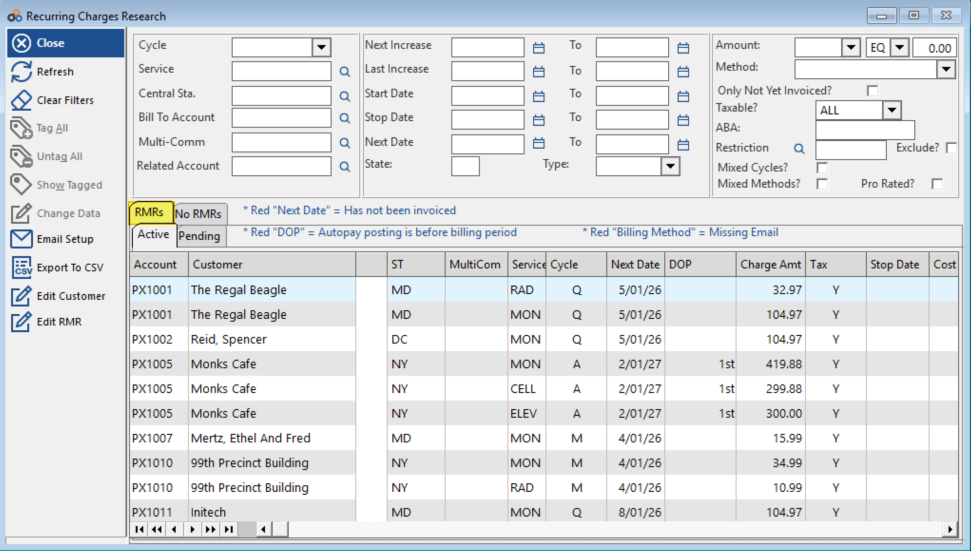
- Navigate to the RMR tab.
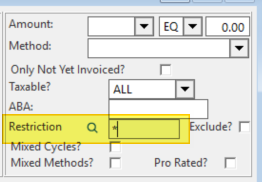
- Enter an asterisk (*) into the Restriction filter field.
- Click the filter button to apply.
This will display all recurring charges for customers who have a restriction. You can scroll to the right or rearrange columns to see the customer's Restrictions field next to the recurring charge information.
To Display Customers WITHOUT Restrictions
- Go to the Recurring Research screen.
- Navigate to the RMR tab.
- Enter an asterisk (*) into the Restriction filter field.
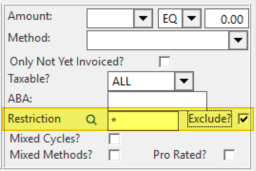
- Check the Exclude? box.
- Click the filter button to apply.
This will display all recurring charges for customers who do not have any restrictions.
Need Additional Help?
Our Customer Success team is here to assist you.
Phone: 847-405-9517 x1
Email: customer.success@alarmbills.com
Copyright © 1999–2026 Cornerstone Billing Solutions. All rights reserved.
Was this article helpful?
That’s Great!
Thank you for your feedback
Sorry! We couldn't be helpful
Thank you for your feedback
Feedback sent
We appreciate your effort and will try to fix the article