Overview
You can view and edit all feeder recurring charges directly from the master account. This feature provides a consolidated view of all feeder account charges without needing to access each feeder account individually.
This article explains how to access the RMRs (Feeder) tab, what information is displayed, how to edit charges, and how to use the available filtering options.
How to Access
Follow these steps to navigate to the RMRs (Feeder) tab:
- Open the Master account.

- Click Recurring Charges.
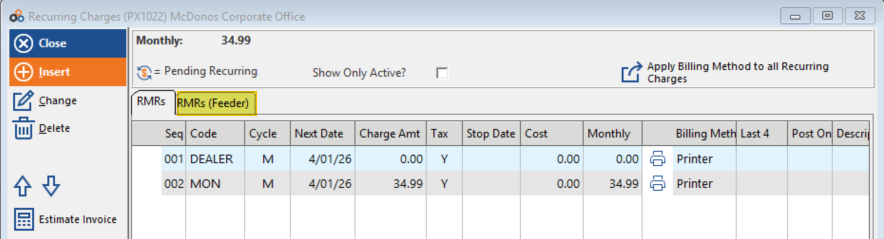
- From the Recurring Charges screen, click the RMRs (Feeder) tab.
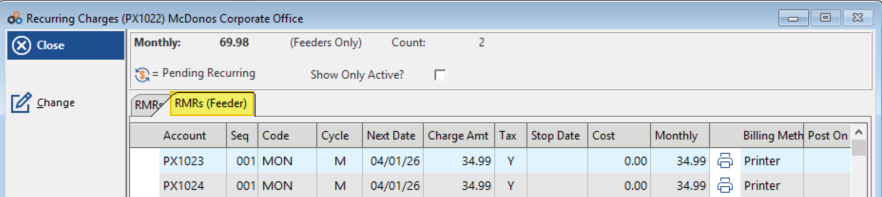
What You'll See
The RMRs (Feeder) tab displays the following information:
| What's Shown | Description |
|---|---|
| All Feeder Account Recurring Charges | A consolidated view of every feeder account's recurring charges in one screen |
| Monthly Amount Billed to the Master | The total monthly charge amount billed to the master account |
| Total Count of Feeder Charges | A running count of all feeder recurring charges on the account |
| Pending Charge Indicators | Status icons displayed next to any charges that are currently pending |
Editing Feeder Charges
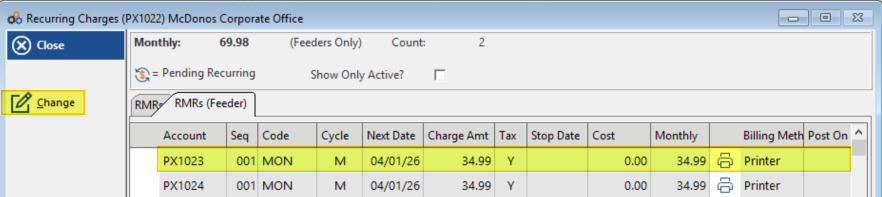
To edit a feeder recurring charge, use either of the following methods:
- Option 1: Highlight the charge and click the Change button.
- Option 2: Double-click the recurring charge directly.
Filtering Options
You can filter the display to show different charge types using the Show Only Active? checkbox:
| Filter Setting | What Is Displayed |
|---|---|
| Show Only Active? — Checked (default) | Active charges only |
| Show Only Active? — Unchecked | All charges, including both active and inactive |
Key Features at a Glance
The RMRs (Feeder) tab gives you the ability to:
| Feature |
|---|
| View all feeder charges from a single screen |
| Edit charges without switching between accounts |
| Track pending charges with visual indicators |
| Filter between active and inactive charges |
| See consolidated monthly billing amounts |
| Monitor the total count of feeder charges |
Need Additional Help?
Our Customer Success team is here to assist you.
Phone: 847-405-9517 x1
Email: customer.success@alarmbills.com
Copyright © 1999–2026 Cornerstone Billing Solutions. All rights reserved.
Was this article helpful?
That’s Great!
Thank you for your feedback
Sorry! We couldn't be helpful
Thank you for your feedback
Feedback sent
We appreciate your effort and will try to fix the article