Overview
The Customer Search by Phone Number feature allows you to quickly locate a customer record using their telephone number. This is especially useful when you have a caller's number on hand and need to pull up their account without knowing their name or account number. This article walks you through the two available methods: searching by full phone number, and searching by area code and/or exchange.
Opening the Customer Search Dialog
To search for a customer by phone number, you first need to open the Customer Search dialog from within the Customer List.
- Open the Customer List. Navigate to the Customer List from the main menu.
- Click the Searches button in the left-hand sidebar of the Customer List screen.
The Customer List sidebar contains action buttons including Close, Insert, Change, Delete, Sort Orders, Tag All, Untag All, and Searches. Click Searches to proceed.
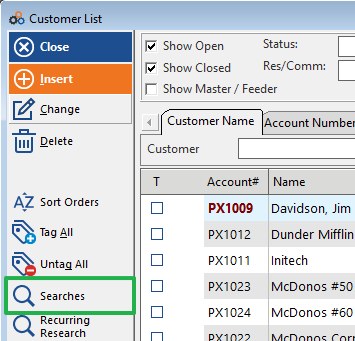
After clicking Searches, the Search Options panel will appear. Select Phone as your search method.
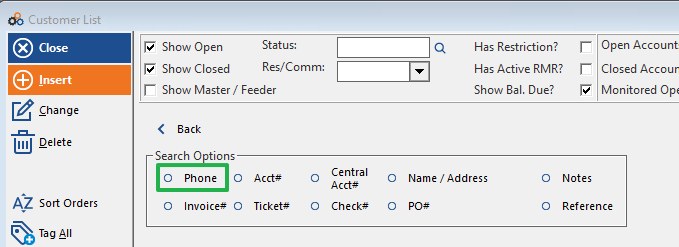
The Search Options panel provides multiple search criteria including Phone, Acct#, Central Acct#, Name / Address, Notes, Invoice#, Ticket#, Check#, PO#, and Reference. Select Phone to open the Customer Search dialog for telephone number lookup.
Search Method 1: Search by Full Telephone Number
Use this method when you have the customer's complete telephone number available.
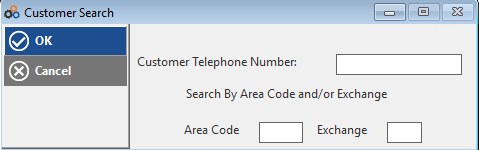
- In the Customer Search dialog, locate the Customer Telephone Number field.
- Enter the full telephone number in the Customer Telephone Number field (e.g., 555-555-5555).
- Click OK to execute the search.
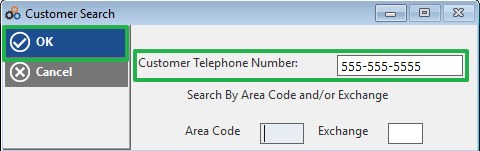
The system will search for the customer record matching the telephone number you entered and return the results in the Customer List.
Search Method 2: Search by Area Code and/or Exchange
Use this method when you only have part of a telephone number — for example, when you want to find all customers within a specific area code or exchange.
- In the Customer Search dialog, leave the Customer Telephone Number field blank.
- Enter the Area Code in the Area Code field, and/or enter the Exchange in the Exchange field.
- Click OK to execute the search.
The system will return all customer records matching the area code and/or exchange you entered. You can use either or both fields to narrow your results.
Cancelling the Search
To exit the Customer Search dialog without performing a search, click the Cancel button in the left-hand panel of the dialog. This will close the search window and return you to the Customer List.
⚠️ IMPORTANT
You can search by full telephone number or by area code and/or exchange — but not both at the same time. If you enter a value in the Customer Telephone Number field, the Area Code and Exchange fields will be disregarded, and vice versa. Use whichever method best matches the information you have available.
Need Additional Help?
Our Customer Success team is here to assist you.
Phone: 847-405-9517 x1
Email: customer.success@alarmbills.com
Copyright © 1999–2026 Cornerstone Billing Solutions. All rights reserved.
Was this article helpful?
That’s Great!
Thank you for your feedback
Sorry! We couldn't be helpful
Thank you for your feedback
Feedback sent
We appreciate your effort and will try to fix the article