Overview
This article explains how to locate a specific check in the system using the Check Number search feature available from the Customer List. This is useful when you need to verify whether a customer's check payment has been posted to our database.
How to Search by Check Number
Follow the steps below to search for a specific check number from the Customer List.
- Open the Customer List. Navigate to the Customer List in the system.
- Click the Searches Icon. Locate and click the Searches Icon within the Customer List toolbar.
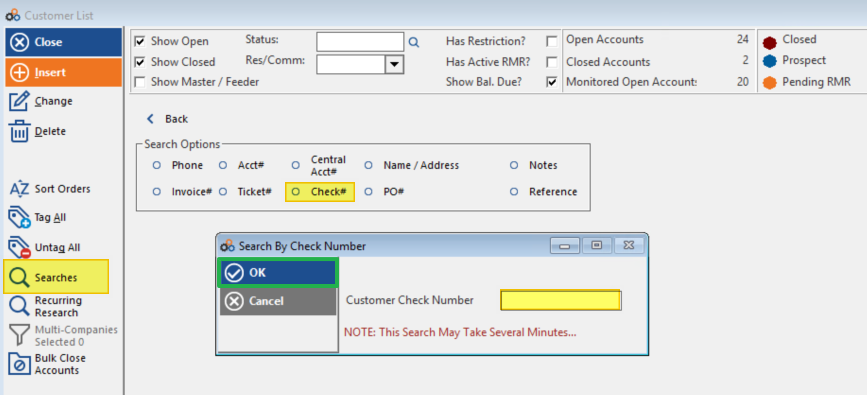
- Select Check#. From the search options that appear, click Check#.
- Enter the check number. Type the specific check number you are looking for into the provided field.
- Click OK. Confirm your entry by clicking OK to run the search.
⚠️ IMPORTANT
If no data appears after performing the search, the check has not yet been posted in our database. Please advise your customer to contact their bank to initiate a trace.
Need Additional Help?
Our Customer Success team is here to assist you.
Phone: 847-405-9517 x1
Email: customer.success@alarmbills.com
Copyright © 1999–2026 Cornerstone Billing Solutions. All rights reserved.
Was this article helpful?
That’s Great!
Thank you for your feedback
Sorry! We couldn't be helpful
Thank you for your feedback
Feedback sent
We appreciate your effort and will try to fix the article