Saving an Address Without Triggering an Update
This article explains how to save an address to a customer record without applying updates to the account. Use this technique when you need to record an address change while preserving the current account state.
How to Save the Address
- Enter the address on the customer record as needed.
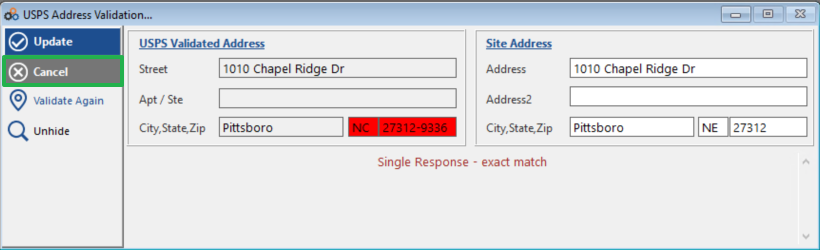
- Click Cancel instead of Update. This saves the address on the customer record without making updates.
⚠️ IMPORTANT
Clicking Update will apply changes to the account. To save the address only — without triggering any updates — always click Cancel.
Need Additional Help?
Our Customer Success team is here to assist you.
Phone: 847-405-9517 x1
Email: customer.success@alarmbills.com
Copyright © 1999–2026 Cornerstone Billing Solutions. All rights reserved.
Was this article helpful?
That’s Great!
Thank you for your feedback
Sorry! We couldn't be helpful
Thank you for your feedback
Feedback sent
We appreciate your effort and will try to fix the article