Overview
If a customer is not receiving emails from Cornerstone, their email address may be on our AWS suppression list. This article explains how to submit a support note so Cornerstone can remove the suppressed email address and restore email delivery to that account.
Steps to Fix a Suppressed Email
- Open the customer account. Navigate to the relevant customer record in Cornerstone.
- Click Support Note. Locate and select the Support Note option within the customer account.
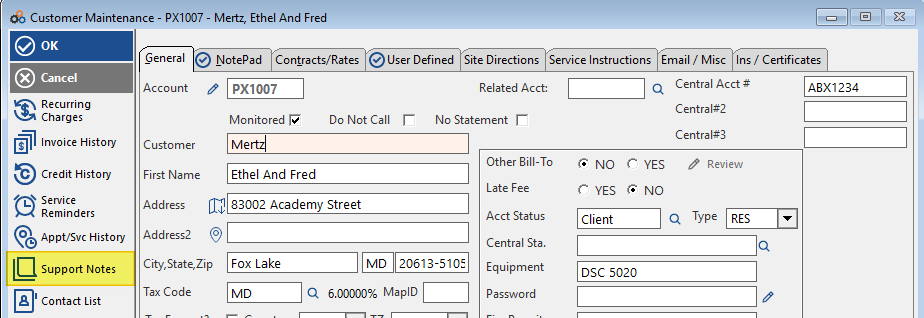
- Click Insert. Use the Insert action to create a new support note.

- Include the email address. In the body of the support note, enter the suppressed email address that needs to be removed.
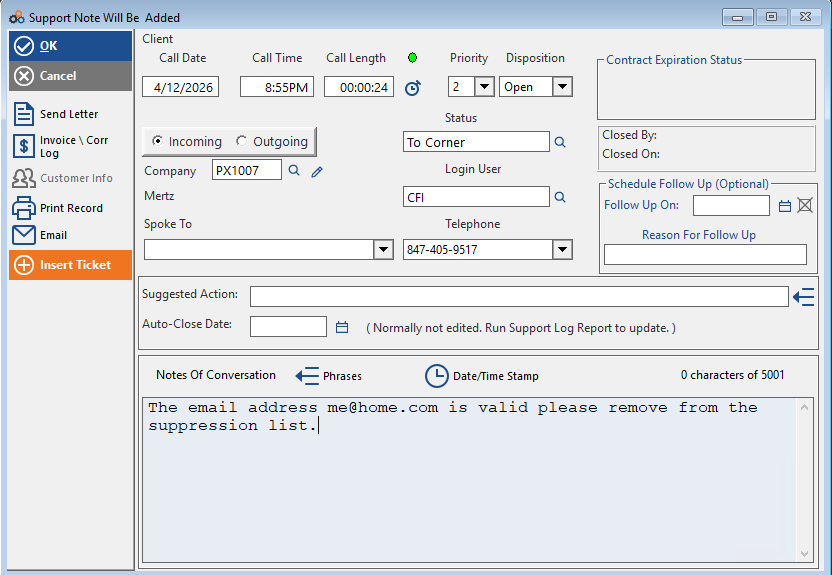
- Submit the note. Click > OK to save the support note. Cornerstone will follow up to remove the email address from the AWS suppression list.
⚠️ IMPORTANT
Removal from the AWS suppression list is handled by Cornerstone after the support note is submitted. You do not need to contact AWS directly. Cornerstone will follow up once the request has been processed.
Need Additional Help?
Our Customer Success team is here to assist you.
Phone: 847-405-9517 x1
Email: customer.success@alarmbills.com
Copyright © 1999–2026 Cornerstone Billing Solutions. All rights reserved.
Was this article helpful?
That’s Great!
Thank you for your feedback
Sorry! We couldn't be helpful
Thank you for your feedback
Feedback sent
We appreciate your effort and will try to fix the article