Overview
This guide explains how to request a change to the Reply-To email address associated with your Cornerstone account. Because this change is made on your behalf by the Cornerstone team, the process requires you to submit a short online form — there are no software settings to configure yourself.
This article is intended for alarm dealer administrators who need to update the email address that appears as the sender or reply destination on outgoing billing communications.
How to Change Your Reply-To Email Address
Cornerstone handles this update on your behalf. To submit your request, follow the step below.
- Complete the change request form. Click the link below to open the secure online form. Fill in all required fields and submit — Cornerstone will make the needed adjustments to your account.
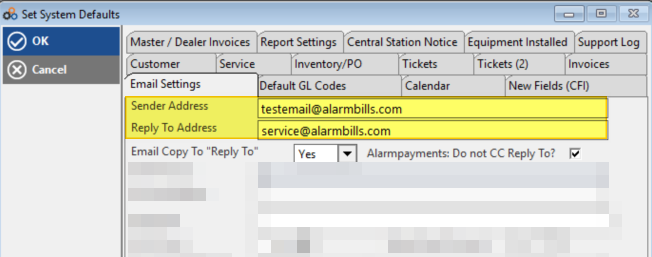
Change to Customer Email — Submit Request Form
⚠️ IMPORTANT
This change is made by Cornerstone — you do not need to adjust any settings in the software yourself. Once your form has been submitted, our team will apply the update and confirm when the change has been made.
Need Additional Help?
Our Customer Success team is here to assist you.
Phone: 847-405-9517
Email: customer.success@alarmbills.com
Copyright © 1999–2026 Cornerstone Billing Solutions. All rights reserved.
Was this article helpful?
That’s Great!
Thank you for your feedback
Sorry! We couldn't be helpful
Thank you for your feedback
Feedback sent
We appreciate your effort and will try to fix the article