Overview
Cornerstone provides a lookup to the United States Postal Service (USPS) to validate mailing addresses and add Zip +4. This ensures addresses are correct and that invoices can be successfully mailed to the location or bill-to address.
This article explains how address validation works, how to interpret validation results, and how to apply corrected addresses to your records.
How Address Validation Works
Automatic Validation
Address validation automatically occurs when you:
- Insert a new customer or prospect
- Add a bill-to address to an account
- Click OK to save the information
The system will check the address against the USPS database and provide validation results.
Manual Validation
To validate an existing site or bill-to address, click the validation icon at any time.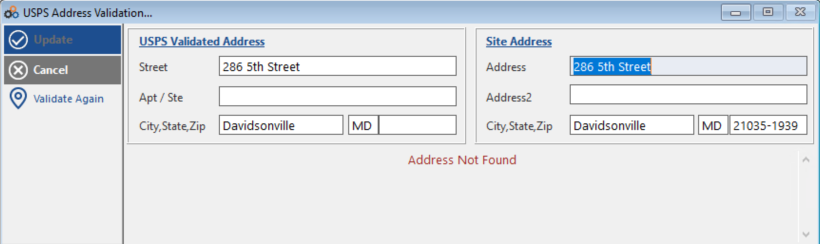
Understanding Validation Results
Common USPS Errors
The system will return errors from the USPS database. The two most common are:
| Error Message | What It Means | What To Do |
|---|---|---|
| "Address Not Found" | The address does not exist in the USPS database | Review your entry for typos or incorrect information |
| "The address you entered was found but more information is needed" | Additional details are required (apartment, suite, or box number) | Add the missing information to match a specific address |
Special Character Restrictions
USPS does not recognize special characters. If your address contains any of the following, review your entry, make edits, and validate again:
- Double quotes (")
- Ampersand (&)
What Address Validation Does
The validation feature will:
- Check spelling — Correct misspelled street names and cities
- Provide correct Zip +4 — Add the four-digit extension to the zip code
- Fill in city names — Enter the city when you provide a zip code
- Verify street addresses — Confirm the address exists in USPS records
Using Validated Addresses
Reviewing Validation Results
After validation completes, review the suggested corrections:
- Check the corrected address information
- Verify the Zip +4 code
- Ensure city and state are correct
Updating Your Record
Select Update to use the validated address in Cornerstone.
⚠️ IMPORTANT
Make sure the Address 1 line has a street address or PO Box before validating.
Benefits of Address Validation
- Improved data accuracy — Reduce address errors in your database
- Better mail delivery — Ensure invoices reach customers
- Complete zip codes — Zip +4 improves USPS processing
- Reduced returned mail — Fewer undeliverable invoices
- Time savings — Automatic validation catches errors immediately
Need Additional Help?
Our Customer Success team is here to assist you.
Phone: 847-405-9517 x1
Email: customer.success@alarmbills.com
Copyright © 1999–2026 Cornerstone Billing Solutions. All rights reserved.
Was this article helpful?
That’s Great!
Thank you for your feedback
Sorry! We couldn't be helpful
Thank you for your feedback
Feedback sent
We appreciate your effort and will try to fix the article