Overview
The Estimate Invoice feature allows you to preview a customer's upcoming recurring invoice before it is actually generated. This is useful for verifying charge amounts, confirming pro-rated calculations, and answering customer questions about their next bill — all before any invoice is issued.
How to Estimate an Invoice
Follow these steps to generate an invoice estimate for a customer:
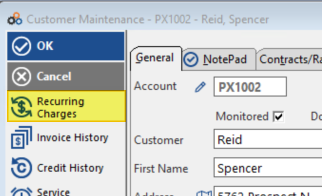
- Click on Recurring Charges from the customer's account.
- Click Estimate Invoice.
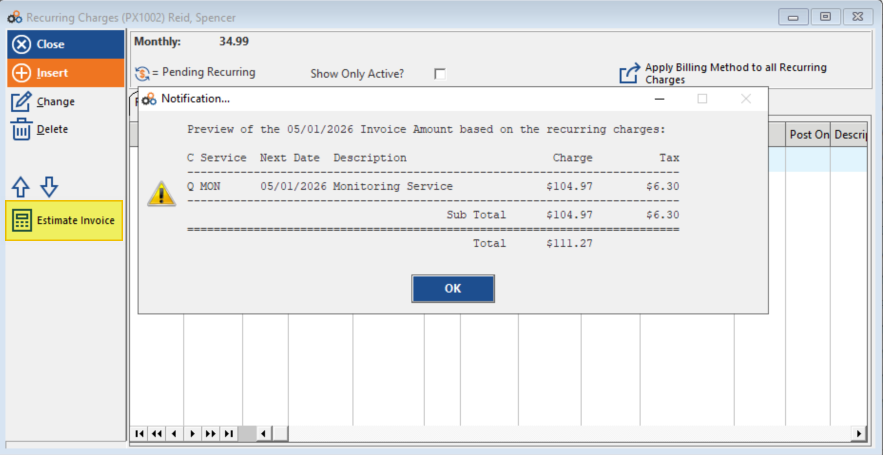
The system will generate a preview of the upcoming invoice based on the customer's recurring charges.
Pro-Rated Charges
If a customer has a pro-rated recurring charge, the estimate will display:
- The pro-rate line item
- The calculated pro-rated charge amount
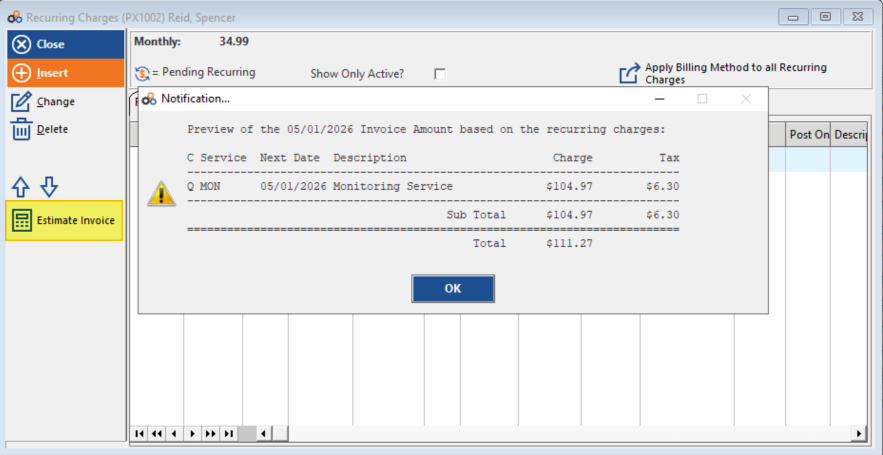
This allows you to verify pro-rated amounts before the actual invoice is generated.
When to Use This Feature
Use the Estimate Invoice function when you need to:
- Check upcoming invoice amounts for customers
- Verify pro-rated charges are calculated correctly
- Respond to customer inquiries about their next bill
- Review recurring charges before processing batch invoices
- Confirm new recurring charges are set up properly
Benefits
The Estimate Invoice feature helps you:
- Preview invoices before generation
- Verify pro-rated charge calculations
- Ensure accuracy before billing customers
- Identify any potential billing issues in advance
- Answer customer questions about upcoming charges
Need Additional Help?
Our Customer Success team is here to assist you.
Phone: 847-405-9517 x1
Email: customer.success@alarmbills.com
Copyright © 1999–2026 Cornerstone Billing Solutions. All rights reserved.
Was this article helpful?
That’s Great!
Thank you for your feedback
Sorry! We couldn't be helpful
Thank you for your feedback
Feedback sent
We appreciate your effort and will try to fix the article