Overview
This article explains how to override the default net terms for a specific customer account. You can set separate net term overrides for both P (Payments) and R (Recurring) invoice types directly from the Contracts / Rates tab. Note that once an invoice has already been generated, its net terms cannot be changed retroactively.
Steps to Change Net Terms for a Specific Customer
- Open the customer account.
- Click the Contracts / Rates tab.
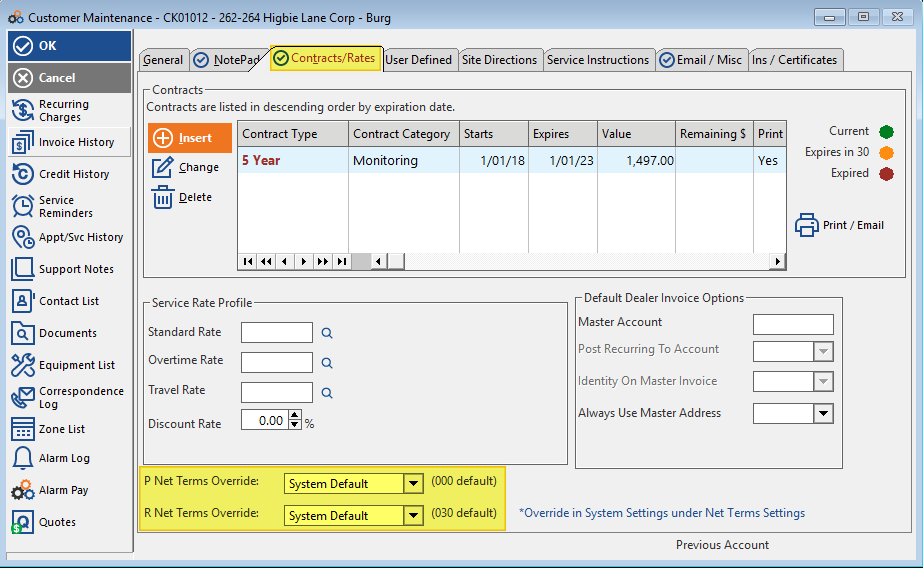
- At the bottom of the window, click the P Net Terms Override drop-down box and select the desired net term.
- At the bottom of the window, click the R Net Terms Override drop-down box and select the desired net term.
The screenshot below shows the location of the Net Terms Override fields on the Contracts / Rates tab:
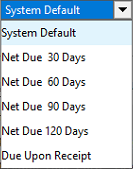
The available choices for both the P and R Net Terms Override drop-down boxes are shown below:
⚠️ IMPORTANT
Once an invoice has been generated with a specific Net Term pattern, the invoice Net Term cannot be changed for that specific invoice.
Need Additional Help?
Our Customer Success team is here to assist you.
Phone: 847-405-9517 x1
Email: customer.success@alarmbills.com
Copyright © 1999–2026 Cornerstone Billing Solutions. All rights reserved.
Was this article helpful?
That’s Great!
Thank you for your feedback
Sorry! We couldn't be helpful
Thank you for your feedback
Feedback sent
We appreciate your effort and will try to fix the article