Overview
This guide explains how to locate and review the Fee Recap section on your monthly reports in Cornerstone. The Fee Recap provides a detailed breakdown of all fees billed to your account for a given month, including quantities, per-unit fees, total amounts, and notes — as well as a summary of other useful end-of-month statistics.
This article is intended for alarm dealer administrators who need to review their monthly billing fees in Cornerstone.
How to Access the Monthly Report
Follow the steps below to navigate to the monthly report and locate the Fee Recap section.
- Open Reports. Click Reports from the main Cornerstone toolbar.

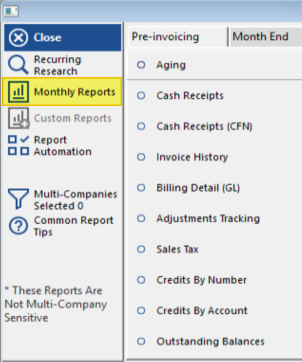
- Select Monthly Reports. Click Monthly Reports from the Reports menu.
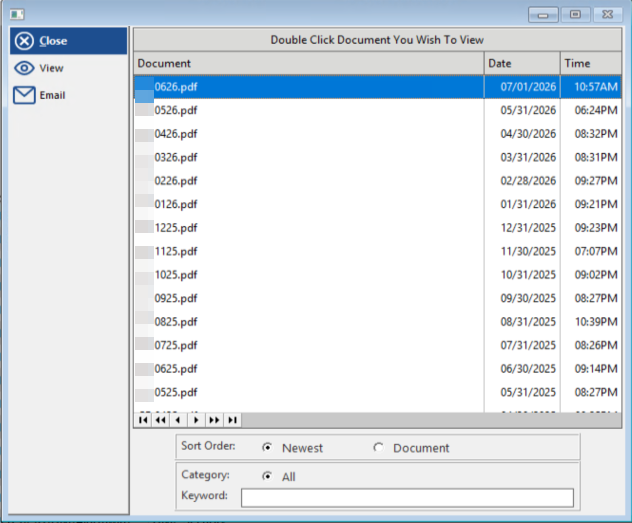
- Open the month in question. A list of available monthly report documents will appear, sorted by date. Double-click the document for the month you wish to review to open it.
- Locate the Fee Section. Once the report is open, scroll to find the Fee Recap section on the report recap.
Understanding the Fee Recap
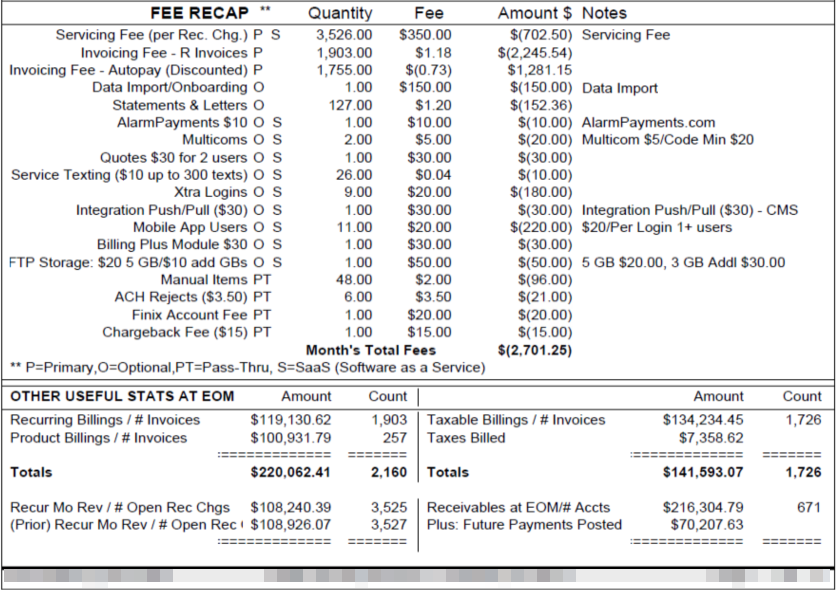
The Fee Recap table lists every fee type applicable to your account for the month. Each row shows the fee name, quantity, per-unit fee, total amount charged, and any relevant notes. The table concludes with a Month's Total Fees figure.
Fee Type Key
Each fee listed in the recap is tagged with one or more letter codes that indicate the fee category. These codes appear alongside the fee name:
| Code | Meaning |
|---|---|
| P | Primary |
| O | Optional |
| PT | Pass-Thru |
| S | SaaS (Software as a Service) |
Fee Recap Line Items
The following table reflects the fee line items as they appear in the Fee Recap section of the monthly report. Quantities, rates, and totals will vary based on your account's activity for the month.
| Fee Name | Type | Notes |
|---|---|---|
| Servicing Fee (per Rec. Chg.) | P, S | Servicing Fee |
| Invoicing Fee - R Invoices | P | |
| Invoicing Fee - Autopay (Discounted) | P | |
| Data Import/Onboarding | O | Data Import |
| Statements & Letters | O | |
| AlarmPayments $10 | O, S | AlarmPayments.com |
| Multicoms | O, S | Multicom $5/Code Min $20 |
| Quotes $30 for 2 users | O, S | |
| Service Texting ($10 up to 300 texts) | O, S | |
| Xtra Logins | O, S | |
| Integration Push/Pull ($30) | O, S | Integration Push/Pull ($30) - CMS |
| Mobile App Users | O, S | $20/Per Login 1+ users |
| Billing Plus Module $30 | O, S | |
| FTP Storage: $20 5 GB/$10 add GBs | O, S | 5 GB $20.00, 3 GB Addl $30.00 |
| Manual Items | PT | |
| ACH Rejects ($3.50) | PT | |
| Finix Account Fee | PT | |
| Chargeback Fee ($15) | PT |
Other Useful Stats at End of Month (EOM)
Below the Fee Recap, the report also displays a summary of key end-of-month statistics for your account, including recurring and product billing totals, taxable billings, taxes billed, receivables, and future payments posted.
| Statistic | Description |
|---|---|
| Recurring Billings / # Invoices | Total dollar amount and count of recurring billing invoices for the month |
| Product Billings / # Invoices | Total dollar amount and count of product billing invoices for the month |
| Taxable Billings / # Invoices | Total taxable billing amount and invoice count |
| Taxes Billed | Total tax amount billed for the month |
| Recur Mo Rev / # Open Rec Chgs | Recurring monthly revenue and count of open recurring charges |
| (Prior) Recur Mo Rev / # Open Rec Chgs | Prior month's recurring monthly revenue and open recurring charge count |
| Receivables at EOM / # Accts | Total receivables balance at end of month and number of accounts |
| Plus: Future Payments Posted | Payments posted that apply to future billing periods |
Need Additional Help?
Our Customer Success team is here to assist you.
Phone: 847-405-9517
Email: customer.success@alarmbills.com
Copyright © 1999–2026 Cornerstone Billing Solutions. All rights reserved.
Was this article helpful?
That’s Great!
Thank you for your feedback
Sorry! We couldn't be helpful
Thank you for your feedback
Feedback sent
We appreciate your effort and will try to fix the article